


Our Days Co-Parenting Calendar
4.494.00 Reviews
App Specs
- Version
- 5.0.2
- Updated On
- License
- Free
- Downloads
- 10,000+
- Developer
- Our Days Admin
- Categories
- Parenting
- Platform
- Android
Screenshots



 Analysis by AppCompare
When two households are trying to follow the same custody plan, the hard part is often not deciding what should happen; it is making sure both adults remember the same details at the right time. I find Our Days Co-Parenting Calendar most useful as a shared place to organize that routine, rather than as a substitute for a clear agreement between parents. It is a free parenting app from Our Days Admin, rated for Everyone, and its focus is practical: bring the calendar and everyday co-parenting tasks into one app.
A useful way to judge it is to follow a normal week from planning through handoff. Before relying on any shared calendar, both parents need to agree on the schedule they are entering and on how they will handle changes. The app can help keep those decisions visible, but it cannot settle disagreements for you. That distinction matters: the app is a coordination tool, and it works best when both people are willing to use the same routine.
From a custody plan to a calmer handoff
I find it useful to begin with the moment a custody plan meets an ordinary week: someone needs to know what happens next, and both homes need the same understanding. A shared calendar can make that routine easier to check, but the handoff still depends on clear agreement between the adults. From there, the most practical question is how to turn the agreed plan into entries both parents can rely on.
Getting the first schedule in place
First off, setting up Our Days Co-Parenting Calendar is a breeze. You download it, follow a few simple steps, and voilà, you're ready to start. The app’s interface is clean and intuitive, which means you won’t waste precious time figuring out where everything is. It’s like having a personal assistant in your pocket, minus the coffee runs!
Its store summary promises a quick start for creating a co-parenting calendar, but I would treat speed as a starting point, not the whole setup. Before entering dates, agree on the recurring pattern, school breaks, and who is responsible for transportation. A calendar can display a plan, but ambiguous arrangements still need a conversation. A small amount of care at the beginning can prevent a week of messages later.
For instance, if the usual weekday rotation changes around a school holiday, note the exception clearly instead of assuming the normal pattern will be understood. I also recommend checking the next few handoffs together after the initial setup. That simple review catches mismatched expectations while they are still easy to fix, rather than when one parent is already waiting at the wrong place.
Using the calendar beyond the basic rotation
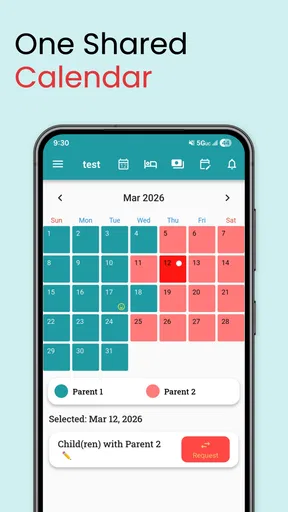
So, what does this app actually do? Well, it’s packed with features designed to make co-parenting less of a headache. You can create shared calendars, manage custody schedules, and even track important events. One of my favorite features is the ability to send reminders. Trust me, those little nudges can save you from a lot of last-minute chaos.
Worth Reading Before You Choose

Flipboard Shows What News Apps Must Do Beyond the Feed

Switching to Android Auto Means Rethinking Your Driving Routine

Google Calendar Makes a Crowded Week Easier to Manage

Ludo King Makes the Most of the Minutes Between Plans

Baby Panda World Brings Quick Play to Modern Phones, but Its Game Library Feels Busy

ESPN’s Live Game View Makes Following Close Games Easier
The calendar is especially helpful when the schedule is familiar but the details vary. A regular exchange may be easy to remember, while a school event, appointment, or one-off change is not. I would use reminders selectively for the events that genuinely need a prompt. If every small item triggers an alert, notifications can become background noise; a few well-chosen reminders are more likely to be useful.
A practical workflow is to enter the schedule first, then add exceptions and time-sensitive events, and finally check the upcoming days from both households’ perspective. Ask: does each parent know when the child changes homes, and is there anything unusual that needs a message? This is more reliable than treating the calendar as a place to record dates and assuming the other person will infer the context.
Notes, expenses, and keeping context together
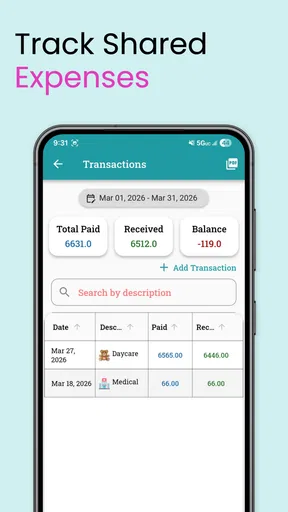
Another cool feature is the journal section. It allows you to jot down notes or messages for your co-parent, which is super handy for keeping everyone in the loop. You can also track expenses—because we all know that budgeting is a big part of parenting.
I would use the journal for concise, practical context: for example, a reminder that a child needs a particular item returned at the next exchange, or a note about a change that affects the week. Keeping a note beside the broader co-parenting routine can make it easier to find later than searching through a long text thread. For sensitive or complicated discussions, though, a short note should not replace a real conversation.
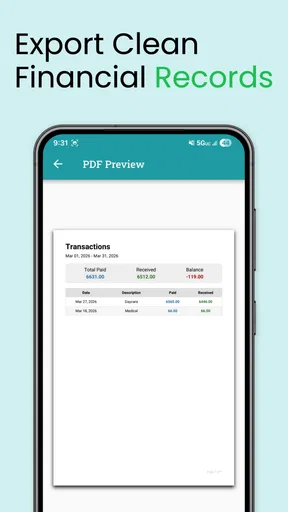
Expense tracking can also help turn a vague memory into a clear record of shared costs. A useful habit is to add an expense soon after it occurs and keep the description understandable to both parents. This is less about building a perfect ledger than avoiding the familiar “what was that charge for?” exchange weeks later. If both adults do not enter information consistently, the record will naturally be incomplete, so the feature depends on a shared habit.
Messages and the handoff itself
Communication is key in co-parenting, and this app gets it. The messaging system is straightforward and effective, making it easy to discuss plans or update each other on the fly. Plus, everything is stored in one place, so you can easily refer back to previous conversations if needed.
For a normal handoff, I would keep the message focused on the change or the child-related detail that needs attention, then use the calendar to show the timing. That division helps: the schedule communicates when, while a message explains what is different. If the child is being picked up earlier than usual, for example, a clear note alongside the changed plan is less likely to be misunderstood than a quick message buried in an unrelated conversation.
Oh, and did I mention the notifications? You can customize them to your heart’s content. Whether you want a ping for every little thing or just the big stuff, it’s up to you.
For two parents with different notification habits, it is worth agreeing on what deserves an immediate alert and what can simply be checked in the app. One person may prefer frequent prompts, while the other finds them distracting. The calendar remains useful only if alerts support the routine rather than turning every ordinary update into another interruption.
Privacy, trust, and sensible boundaries
Now, let’s talk about privacy. We all want to make sure our personal info is safe, right? The app takes security seriously, with data encryption and secure logins ensuring your information stays private. It's peace of mind that’s worth its weight in gold.
Co-parenting records can include family schedules, messages, and expenses, so I would still be deliberate about what I put in any shared digital space. Keep entries relevant to coordination, and make sure both parents understand who is expected to read and update them. Good organization is valuable, but it does not remove the need for careful judgment about personal details or respectful communication.
Where this approach works—and where it can snag
Using the app has been a smooth ride for me. I love how it keeps everything in one place, reducing the need for endless text chains and emails. It’s like having a personal secretary who never takes a day off. Plus, being able to access everything on the go means I can manage my schedule anywhere, anytime.
The biggest benefit is having one shared reference point instead of reconstructing plans from separate calendars, email threads, and text messages. That advantage is strongest when both parents participate. If one parent continues to send changes only by text, the other may have to copy them into the calendar, and that extra step creates room for missed updates. A shared app cannot make an uneven workflow effortless.
Compared with a general calendar app, Our Days is shaped around co-parenting tasks such as custody schedules, messages, notes, and expenses. A regular calendar may be preferable if all you need is a simple schedule and both adults already use the same system comfortably. On the other hand, relying only on texts makes it harder to see the whole pattern at a glance. I see this app as a middle ground: more purpose-built than a basic calendar, but still dependent on the parents agreeing how to use it.
Sure, there’s a bit of a learning curve when you first start using it, but once you get the hang of it, it becomes second nature. The support team is also pretty responsive, which is a huge plus if you ever run into any issues.
One everyday example shows both the payoff and the friction. Imagine a parent notices on a weekday that a school event overlaps with the planned exchange. They can check the shared schedule, message the other parent about the change, and make sure the relevant timing is visible for the handoff. If both parents confirm and keep the calendar current, the child’s day is easier to coordinate. If one person assumes a message automatically changed the schedule, while the other expects the calendar to be updated too, confusion can remain. I would treat a message and a calendar change as separate steps whenever timing changes.
Who should choose it, and who may prefer another tool
All in all, Our Days Co-Parenting Calendar is a solid app that really understands the challenges of co-parenting. It’s practical, user-friendly, and, most importantly, it helps reduce the stress that comes with managing shared responsibilities. If you’re looking for a way to streamline your co-parenting life, this app is definitely worth checking out.
I would recommend it to parents who have a repeating custody routine, need to keep changes visible, and want messages and practical records gathered around that routine. It may also suit a parent who currently acts as the family’s human reminder system and wants a more orderly way to track events and shared expenses. The app is less compelling if the other parent will not participate, if the schedule is already simple enough for a shared general calendar, or if the main need is formal dispute resolution rather than everyday coordination.
The app is free to install, with in-app purchases ranging from about five dollars to about forty-eight dollars per item. It has a 4.5 average from around 184 ratings, and more than 10,000 installs. It was released in December 2020, and version 4.5.11 supports Android 6.0 and newer. Those details make it easy to assess whether it fits your device and budget, but the more important question is whether both households will maintain the same shared process.
For someone deciding whether to try it, I would start with a modest test: enter the established schedule, add a few upcoming exceptions, and agree with the other parent how changes will be confirmed. That will quickly show whether a dedicated co-parenting calendar reduces your back-and-forth or simply adds another place to check. The app is intended for everyone, but its usefulness depends less on age rating than on clear expectations between the adults using it.
So go ahead, give it a whirl, and see how it can help you stay organized and keep your co-parenting game strong. Happy organizing!
Pros
- User-friendly interface simplifies scheduling.
- Syncs seamlessly with multiple devices.
- Customizable notifications for reminders.
- Secure data with encryption for privacy.
- Supports multiple co-parenting arrangements.
Cons
- Limited free features without subscription.
- Occasional syncing delays reported.
- No offline mode available yet.
- Requires internet for most functionalities.
- No integration with some popular calendars.
FAQs for Our Days Co-Parenting Calendar
What is the primary function of the Our Days Co-Parenting Calendar app?
The Our Days Co-Parenting Calendar app is designed to help co-parents effectively manage and coordinate their schedules. It provides a shared calendar where both parents can input and track events, appointments, and custody arrangements. This ensures transparency and reduces miscommunication, making it easier to handle parenting responsibilities.
Is the Our Days Co-Parenting Calendar app available on both Android and iOS?
Yes, the Our Days Co-Parenting Calendar app is available for download on both Android and iOS platforms. You can find it on the Google Play Store for Android devices and the Apple App Store for iOS devices. This cross-platform availability ensures both parents can access the app regardless of their smartphone preference.
Does the app offer any features to improve communication between co-parents?
Absolutely, the app includes features aimed at enhancing communication. It allows for in-app messaging, which keeps all co-parenting discussions organized and easily accessible. Additionally, notifications and reminders can be set up to alert both parents about upcoming events or changes, promoting real-time coordination.
How secure is the data shared within the Our Days Co-Parenting Calendar app?
The app prioritizes user privacy and data security. It employs encryption protocols to protect all shared information, ensuring that only authorized users have access. Users can also set up secure logins and passwords, adding an extra layer of protection for sensitive data and communications.
Are there any costs associated with using the Our Days Co-Parenting Calendar app?
The app offers a free version with basic functionalities, making it accessible to a wide audience. For users seeking enhanced features, such as advanced scheduling options or additional customization, a premium subscription is available. This model allows users to choose based on their specific needs and budget.


